The Excpt tab
What this is
When a picker can't pick a line as asked — the bin is short, the wrong part is in the carton, or the part is damaged — they report a pick exception. The Excpt tab on the warehouse phone lists every one, so the floor can see what's still waiting on the office, what the office decided, and which cancelled orders need their stock put back on the shelf.
Reporting a problem is part of picking; see Picking. The office resolves exceptions from the triage queue.
Before you start
- Role: anyone who can see orders. The Excpt tab is on the Warehouse bottom bar; Office users and Administrators use the triage queue on the desktop. Only Office users and Administrators can resolve an exception or mark it reviewed.
- Getting there: tap Excpt on the bottom bar. A red number on it counts the open exceptions plus any stacks waiting to go back on the shelf.
- You'll need: nothing.
Step by step
-
Tap Excpt. The list opens on Open — the problems still waiting for the office. The line under the title says how many.
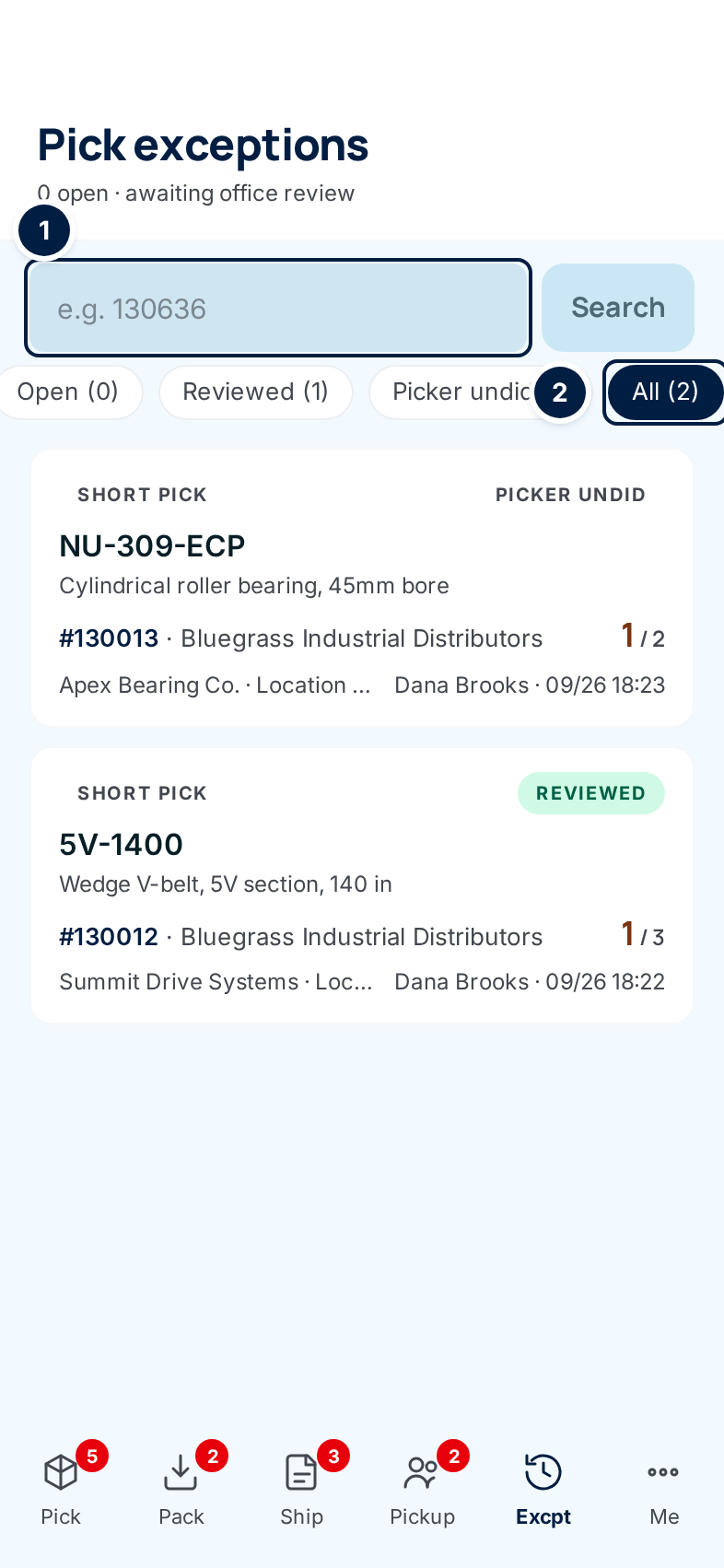
Each card shows the kind of problem (Short pick, Mispick or Quality), the part number, its status, the order number and customer, the supply partner and reason, and who reported it when. A short pick shows short / asked on the right; a mispick shows the part that was actually in the carton.
-
Switch tabs to see other exceptions: Reviewed (the office has dealt with it), Picker undid (the picker took the report back before the office looked), and All ②. Each tab shows its count.
-
Search by order number or original release number ①, then tap Search. A search looks across every status, and a line under the box says how many matched. Clear ends the search.
-
Tap a card to see the details.
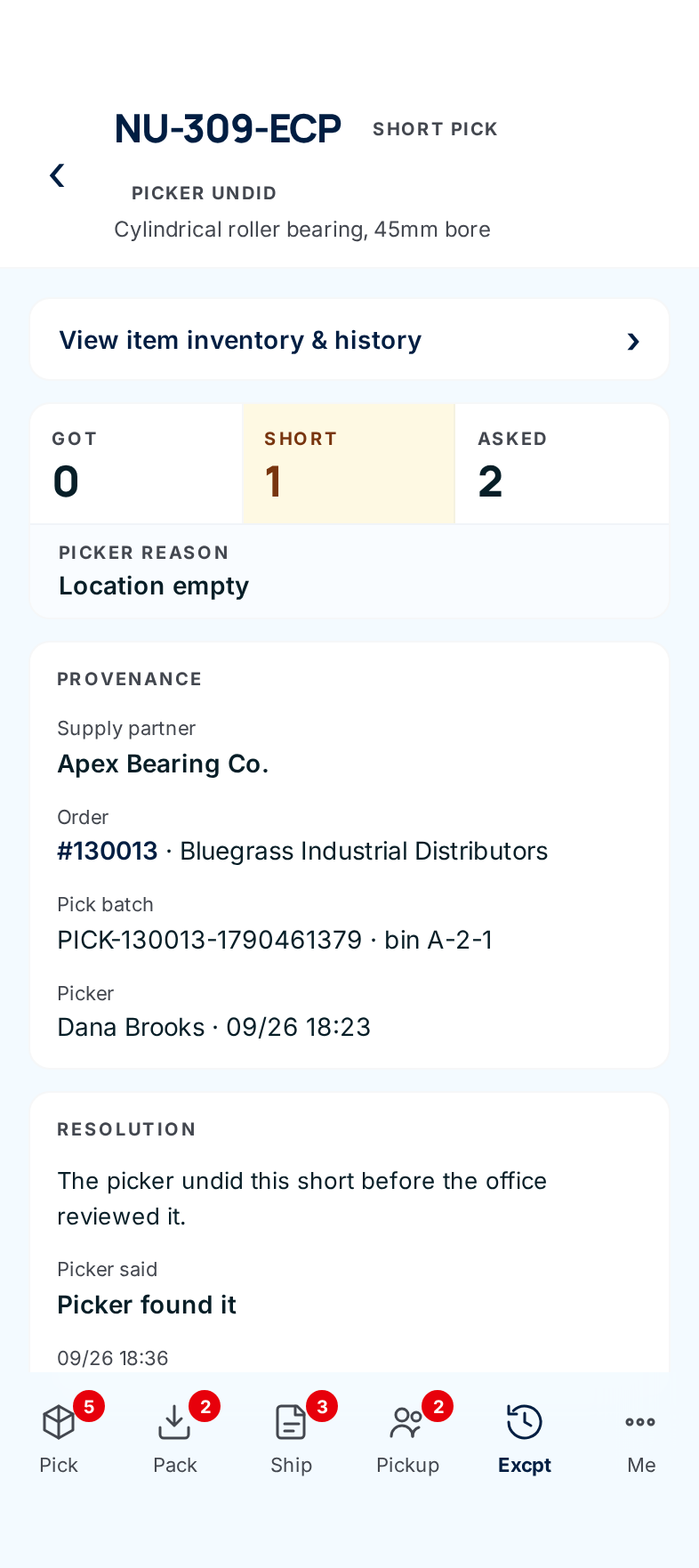
Kind What the top of the page shows Short pick Got, Short and Asked, and the Picker reason. Mispick Expected (picked line) against Actual in carton, the picker's reason, and any Photo evidence. Quality The Reason and the picker's note, and any Photo evidence. A flag on a whole pick batch is titled Batch quality flag. Provenance says which supply partner, order, pick batch (and bin), and who reported it. Resolution says what happens next: for an open exception, the office's choices; for a reviewed one, who reviewed it, when, what they decided and their note; for one the picker undid, what the picker said.
-
Leave the Resolution form for the office. The phone shows Resolve — choose an action, Resolve order block, Mark reviewed and Acknowledge to Warehouse users too, but submitting them opens an Access denied page (#1563).
-
Confirm restocks. If an order was cancelled after its picked items were set down in a staging area, a Return to shelf card appears at the top of the list. It names the area, the order and customer, and each item, quantity and bin to put back. Put the stack back, then tap Restocked — it turns amber and asks you to tap again. The card disappears.
Every field and option
The list
| Field or control | What it means | Required | Default | What changes when you set it |
|---|---|---|---|---|
| Pick exceptions, N open · awaiting office review | The screen title and how many exceptions are open. | — | — | Read-only. |
| Search box ("e.g. 130636") | An order number or original release number. | No | Empty | — |
| Search | Runs the search across every status. | — | — | Shows N matches for "…"; the tab counts are hidden. |
| Clear | Ends the search. | — | — | Back to the full list. |
| Search every status and type | Shown when a search was limited to one status or kind: widens it. | — | — | Searches everything. |
| Open (N) | Waiting on the office. | — | Selected | Filters the list. |
| Reviewed (N) | Dealt with by the office. | — | — | Filters the list. |
| Picker undid (N) | Taken back by the picker. | — | — | Filters the list. |
| All (N) | Every exception. | — | — | Filters the list. |
| Return to shelf card | Stock from a cancelled order still sitting in a staging area: area, order, customer, time cancelled, and each item, quantity and bin. | — | — | — |
| Restocked | Confirms the stack is back on the shelf. Asks you to tap again. | — | — | The card disappears. |
| Exception card | Kind, part number (or Batch-level flag and the batch number), status, order and customer, short/asked or the actual part, supply partner and reason, reporter and time. | — | — | Tap to open it. |
An exception
| Field or control | What it means | Required | Default | What changes when you set it |
|---|---|---|---|---|
| Part number (title), kind and status pills, description | Which exception. | — | — | Read-only. |
| ‹ (back arrow) | Back to the list. | — | — | — |
| Message at the top | After an office action: Marked reviewed., Order block resolved., Already resolved — no change made., Pick a disposition before submitting. or an error. | — | — | Read-only. |
| View item inventory & history › | Opens the item: stock, bins and recent movements. | — | — | — |
| Got / Short / Asked, Picker reason | Short picks: what was picked, what was missing, what the line asked for, and why. | — | — | Read-only. |
| Expected (picked line) / Actual in carton | Mispicks: the part that should have been picked, and the one that was. | — | — | Read-only. |
| Reason | Quality flags: what's wrong, with the picker's note. | — | — | Read-only. |
| Provenance | Supply partner, Order (tap the number to open it), Pick batch and bin, and Picker / Picker / packer / Flagged by with the time. | — | — | Read-only. |
| ✉ Email supply partner | Short picks: opens your mail app with a message to the supply partner's contact. If none is on file, fill in the address yourself. | — | — | Nothing in ConsignTrak changes. |
| Photo evidence | Photos taken when the problem was reported. Tap one to view it full screen; ‹ and › step through them, Download saves one, × closes. | — | — | — |
| Resolve — choose an action, Note, Resolve order block | Office and Administrator only. The office's decision for an exception that's holding up an order. | — | — | See the triage queue. |
| Note (optional), Mark reviewed / Acknowledge | Office and Administrator only. Takes an exception that isn't blocking an order off the Open tab. | — | — | See the triage queue. |
| Reviewed by, Disposition, Note | On a reviewed exception: who, when, what they chose and why. | — | — | Read-only. |
| Picker said | On an exception the picker undid: their reason. | — | — | Read-only. |
What happens next
- Open exceptions wait for the office. An exception that blocks an order holds that order until the office resolves it. What each decision does to the order is on the triage queue.
- Reviewed exceptions move to the Reviewed tab with the office's decision.
- Restocked records who put the stack back and when. Stock figures don't change — a cancelled order's items never left the books.
Common problems
"Access denied" after submitting a resolution — resolving is the office's job. Tell the office what you know; nothing changed.
Nothing matches my search — the search takes the order number or the original release number, not the part number. Check the number on the paperwork.
The Excpt tab has no number — nothing is open and nothing is waiting to be restocked.