History and the audit-chain anchor
What this is
Two read-only views on a supply partner's hub look backwards in time:
- View history shows the partner's archive from the system the warehouse used before ConsignTrak: years of closed orders, their busiest months, top customers and top items. It's how you answer "how much did we ship for them in 2019?" without the old system.
- Audit Chain Anchor is a short code that proves the partner's stock history in ConsignTrak hasn't been altered. You can give it to the partner to keep.
Before you start
- Role: Office or Administrator for View history. Only an Administrator sees the Audit Chain Anchor.
- Settings: none.
- You'll need: for the history, the partner's archive must have been imported when ConsignTrak was set up. It's matched by manufacturer code, so a partner whose code changed since the old system won't have history.
Step by step
Look at the archive
- Open the partner's hub and choose View history at the top.
- Read the headline numbers: Total Orders, Total Lines, Distinct Customers and Years Covered (with the first and last year underneath).
- Hover over the bar chart — Monthly Volume — last 60 months. Each bar is a month: the dark part is orders, the light part is lines. The panel above the chart shows the month you're pointing at. The top right shows the peak month and the five-year monthly average.
- Scan the tables: Top Customers (the ten customers with the most orders), Top Items (the ten most-shipped part numbers) and Recent Closed Orders (the latest 25 archived orders). Customer names and part numbers that match a record in ConsignTrak are links.
The demo instance used for these screenshots has no archive, so there's no picture of this page. If a partner has no archive, the page says No archived history for this supply partner. — see Common problems.
Share the audit-chain anchor
-
Open the partner's hub and scroll to the bottom.
-
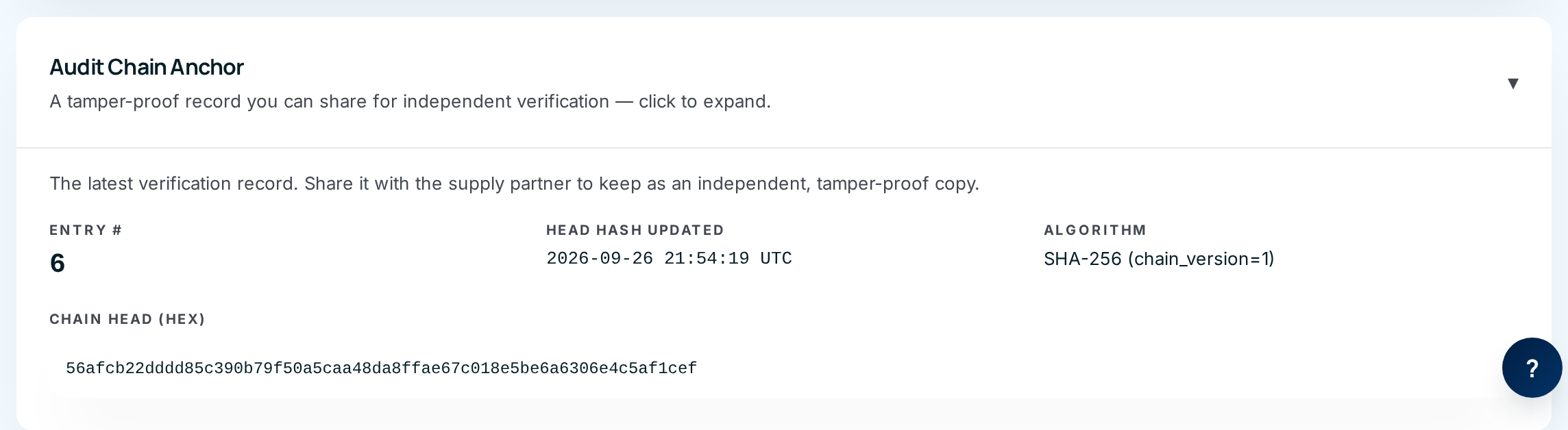
Click Audit Chain Anchor to expand it.
-
Copy the long code under Chain Head (hex), together with the Entry # and Head Hash Updated time.
-
Send them to the supply partner to keep — in an email, or on their monthly paperwork.
What the anchor means, in plain English
Every stock movement for this partner — each receipt, shipment, adjustment and count — is written to the audit trail as a link in a chain. Each link includes a fingerprint of the one before it, so changing or deleting any past entry would break every fingerprint after it.
The Chain Head is the fingerprint of the latest link. If the partner keeps today's value, then at any time later the warehouse can show that the history up to that entry is exactly what it was when the partner received the code. Nobody — not the warehouse, not an administrator — can quietly rewrite the past without the codes no longer matching.
There's no screen for running that check; if a partner ever questions their history, ask whoever runs your ConsignTrak installation to verify it against the anchor they kept.
Every field and option
View history
| Field or control | What it means | Required | Default | What changes when you set it |
|---|---|---|---|---|
| Code — History (title), ← and breadcrumb | Which partner; back to the hub. | — | — | Leaves the page. |
| Source: CAS-REP archive (read-only) | Where the data comes from: the previous system. Nothing here can be edited. | — | — | Read-only. |
| Total Orders, Total Lines, Distinct Customers, Years Covered | Headline totals for the whole archive. | — | — | Read-only. |
| Monthly Volume — last 60 months | Orders (dark) and lines (light) per month. Hover a bar to see Orders and Lines for that month. | — | "Hover a bar" | Updates the panel above the chart. |
| Peak month / 5-year average | The busiest month, and the average orders per month. | — | — | Read-only. |
| Top Customers — Customer, Orders, Last Order | The ten customers with the most archived orders, and their latest order date. | — | — | A customer name opens that customer. |
| Top Items — Item, Description, Lines, Last Sold | The ten most-shipped part numbers. | — | — | A part number opens that item. |
| Recent Closed Orders — Release, Customer, Entry Date, Ship Date, Lines | The 25 latest archived orders. These are history, not warehouse work. | — | — | Customer names link to the customer. |
| No archived history for this supply partner. | Shown instead of all of the above when there's no archive. | — | — | Read-only. |
Audit Chain Anchor (on the hub)
| Field or control | What it means | Required | Default | What changes when you set it |
|---|---|---|---|---|
| Audit Chain Anchor (click to expand) | Opens the panel. | — | Collapsed | Shows the anchor. |
| Entry # | How many movements are in this partner's chain so far. | — | — | Read-only. |
| Head Hash Updated | When the latest movement was recorded (in UTC). | — | — | Read-only. |
| Algorithm | How the fingerprints are made (SHA-256). Include it when you send the anchor. | — | — | Read-only. |
| Chain Head (hex) | The fingerprint to give the partner. | — | — | Read-only; select and copy it. |
What happens next
- Viewing either panel changes nothing.
- The anchor changes every time a movement is recorded for the partner, so the code you send today will differ from next month's. That's expected — each one proves the history up to its own entry.
The partner owns the stock but can't see the warehouse floor. The anchor lets them hold their own proof of the record, instead of having to take the warehouse's word for it — useful for ISO 9001 audits and any dispute.
Common problems
"No archived history for this supply partner." — Either the partner has no orders in the previous system, or the archive wasn't imported for them. The import is a one-time setup step done by whoever installed ConsignTrak.
"No inventory activity has been recorded for this supply partner yet, so there's nothing to verify." — A brand-new partner has no movements, so no anchor. One appears after their first receipt, shipment or adjustment.
I don't see Audit Chain Anchor. — It's shown to Administrators only.