Adjustments review
What this is
The Adjustments page is the office's check on every stock correction. Manual adjustments and cycle-count corrections are the changes most likely to raise a supply partner's questions, because they change stock without a delivery or a shipment behind them. The page has two parts. The ledger lists every correction in a date range. Below it, a panel lists pick exceptions that suggest the shelf count was wrong, and flags any that nobody followed up with a correction.
Before you start
- Role: any staff user can open it; it's meant for Office and Administrator users, who make the corrections. It's a desktop page.
- Settings: none.
- You'll need: nothing. The page opens on the last 30 days.
Step by step
-
Open Adjustments in the Inventory section of the sidebar.
-
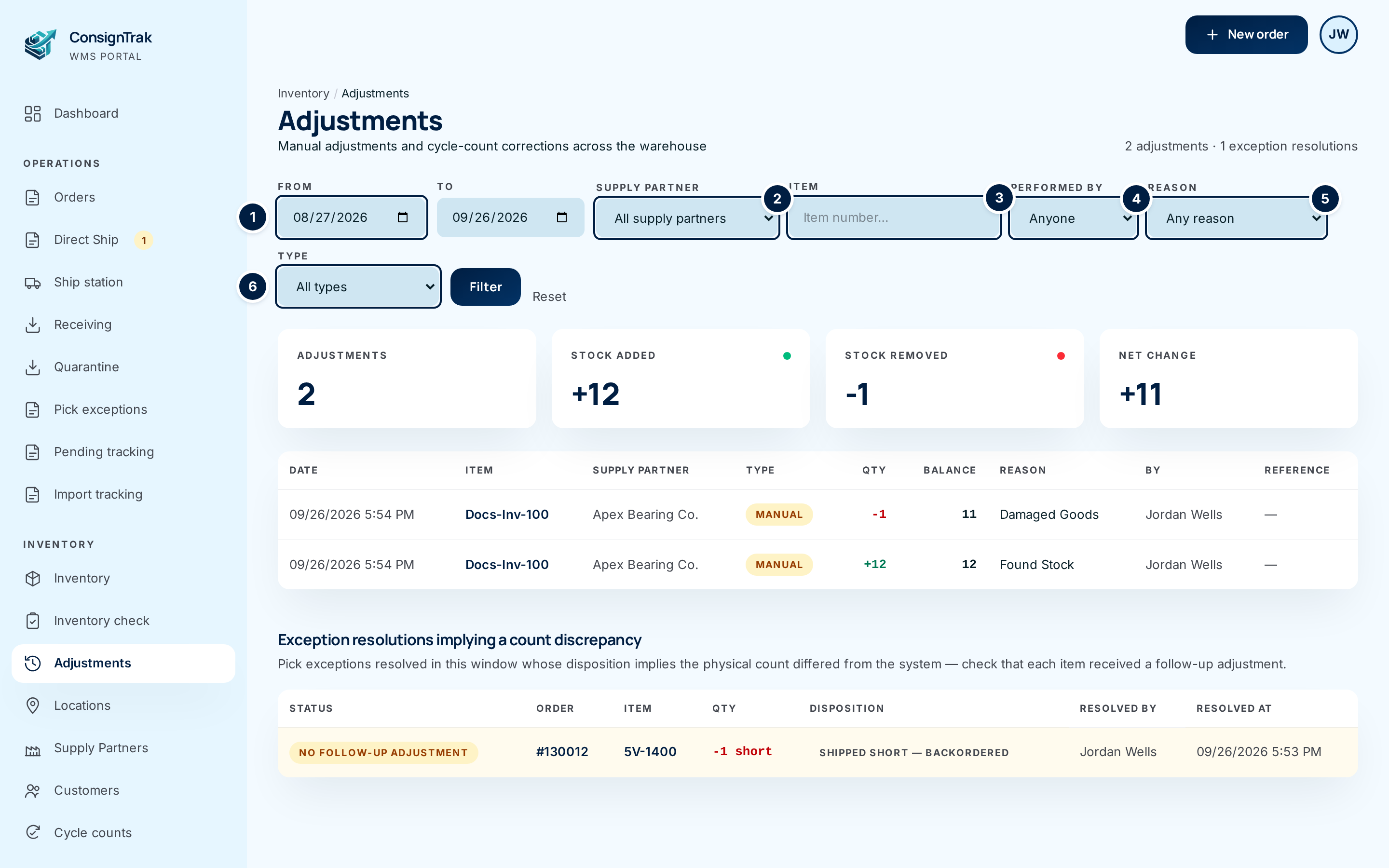
Set the window with From ① and To. Leave both empty to get the last 30 days.
-
Narrow it with Supply Partner ②, Item ③ (part number), Performed by ④, Reason ⑤ and Type ⑥. Click Filter. Reset clears everything back to the last 30 days.
-
Read the cards. Adjustments counts the rows. Stock Added and Stock Removed total the units in and out. Net Change is the difference.
-
Scan the ledger. Look for large quantities, reasons such as Other, or one person making many corrections to one supply partner. Click the item to open it. In Reference, View count opens the cycle count behind a correction. Short-pick exception or Mispick exception opens the exception it was made from.
-
Work the exception panel. Under Exception resolutions implying a count discrepancy, every row marked No follow-up adjustment (amber) is a pick where the shelf didn't match and nobody corrected stock afterwards. Open the item, count it, and record an adjustment or start a cycle count. Once a correction for that item is recorded at or after the resolution time, the row turns to a green Adjusted.
A short pick that shipped short means ConsignTrak expected units that weren't there. Until someone corrects on-hand, the item keeps promising stock that doesn't exist, and the supply partner's report overstates what the warehouse holds for them.
Every field and option
Filters
| Field or control | What it means | Required | Default | What changes when you set it |
|---|---|---|---|---|
| From, To | The date range, both days included. | No | The last 30 days | Limits both the ledger and the exception panel. |
| Supply Partner | One supply partner's corrections. Not shown to supply-partner users, who only ever see their own. | No | All supply partners | Narrows the ledger. |
| Item | Part number to look for. | No | Empty | Narrows the ledger. |
| Performed by | The person who made the correction. | No | Anyone | Narrows the ledger. |
| Reason | Cycle Count Variance, Damaged Goods, Found Stock, Data Correction, Sample / Demo, Pick Discrepancy, Other. | No | Any reason | Narrows the ledger. |
| Type | Manual adjustment (from the adjustment form or a pick exception) or Cycle count. | No | All types | Narrows the ledger. |
| Filter | Applies the filters. | — | — | Reloads the page. |
| Reset | Clears every filter. | — | — | Back to the last 30 days. |
| Inventory / Adjustments (breadcrumb) | Back to the Inventory list. | — | — | Leaves the page. |
| N adjustments · N exception resolutions | Counts for the window. A + after the second number means there are more than shown. | — | — | Read-only. |
Summary cards (shown when there are rows)
| Card | What it means |
|---|---|
| Adjustments | How many corrections match. |
| Stock Added | Units added in total. |
| Stock Removed | Units removed in total. |
| Net Change | Added minus removed. |
Ledger columns
| Column | What it means |
|---|---|
| Date | When the correction was recorded. |
| Item | The part number; click to open it. |
| Supply Partner | Who owns the item. |
| Type | Manual or Cycle count. |
| Qty | Units added (green, +) or removed (red, −). |
| Balance | On-hand straight after the correction. |
| Reason | The reason chosen. Cycle-count rows show the count's own note. |
| By | Who made it. A dash means the system. |
| Reference | View count for a cycle count, Short-pick exception or Mispick exception for a correction made while resolving one, or a dash for a plain adjustment. |
Page numbers under the ledger move through long lists; filters stay set. No adjustments in this window. with Record an adjustment shows when nothing matches.
Exception resolutions implying a count discrepancy
| Column | What it means |
|---|---|
| Status | No follow-up adjustment (amber row) until a correction exists for the item at or after the resolution; then Adjusted. |
| Order | The order the exception was on; click to open it. |
| Item | The item; click to open it. |
| Qty | For a short pick, how many were missing (−N short). For a mispick, what was actually picked. |
| Disposition | How the exception was resolved: Shipped short — backordered or Shipped as-is. |
| Resolved by, Resolved at | Who resolved it, and when. |
The panel shows the 50 most recent. When there are more, it says Showing the 50 most recent — narrow the date range to see the rest.
What happens next
The page only reads. Corrections you make from it (by opening an item and adjusting, or starting a count) appear in the ledger straight away, and the matching exception row turns Adjusted.
Common problems
An exception I fixed still says No follow-up adjustment. — The correction must be for the same item and recorded at or after the time the exception was resolved. A correction made before the resolution doesn't count. Record one now if the stock is still wrong.
An old short pick isn't in the panel. — Very old short picks that were reviewed without a recorded resolution can't be classified, so they never appear here.
The page is empty. — Nothing was corrected in the last 30 days. Widen From and To.