Reading variance
What this is
After a line is counted, ConsignTrak shows its variance: the number counted minus the number it expected. This page helps the person approving corrections (an Office user or Administrator) decide, line by line, whether the count is right and the stock should be corrected, or whether someone should count again first. The steps for entering counts and approving are on Running a count.
Before you start
- Role: Office or Administrator to approve. Anyone who can count can recount.
- Settings: none.
- You'll need: a batch that is In progress, with counted lines.
Step by step
-
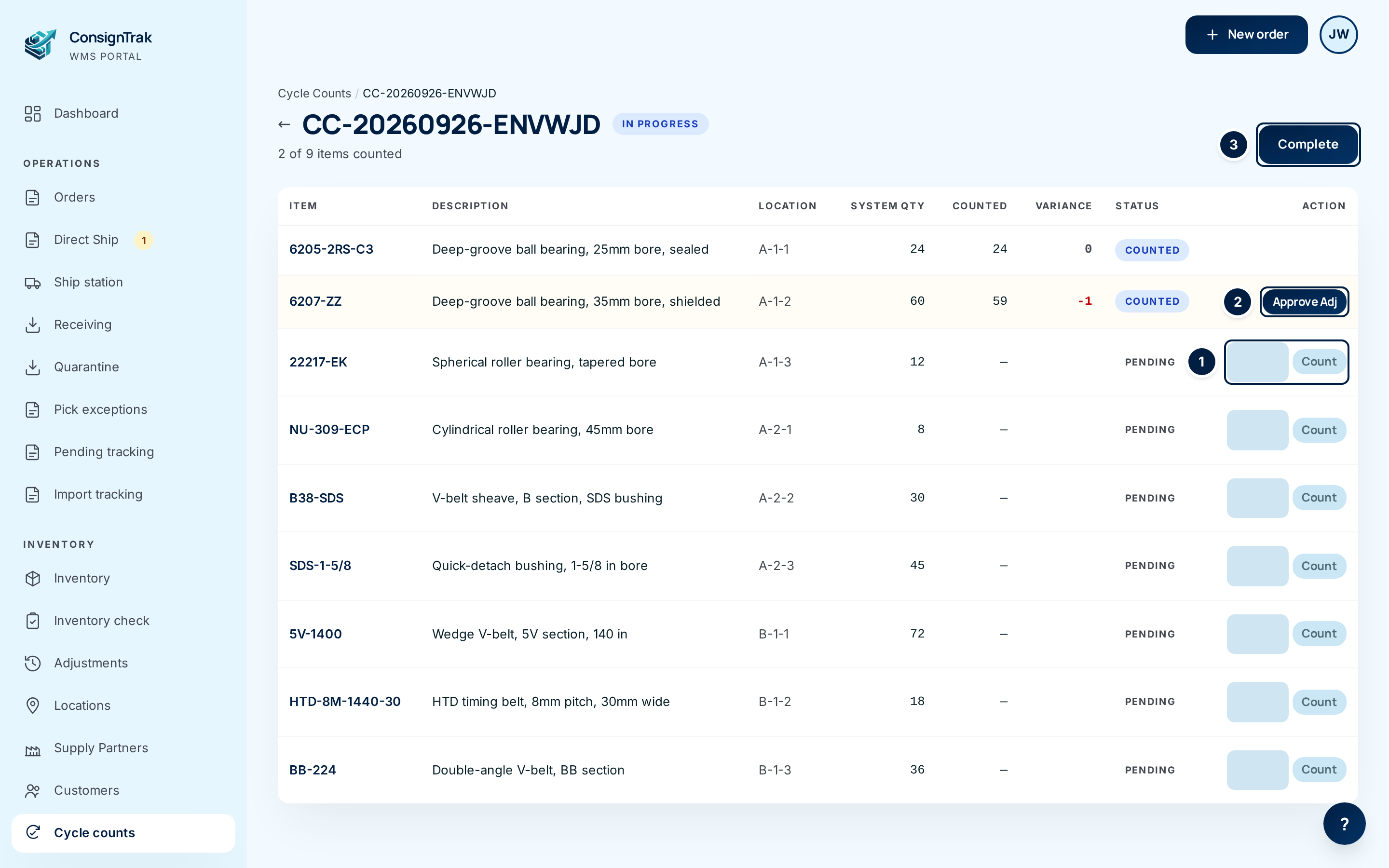
Open the batch from Cycle counts and look for shaded lines. Those are the ones that didn't match.
-
Read the variance.
You see It means Approving will 0 (grey) The bin held exactly what ConsignTrak expected. Nothing to approve. The line stays Counted. -3 (red) Three fewer in the bin than expected. Take 3 off the item's stock. 5 (green) Five more in the bin than expected. Add 5 to the item's stock. -
Check what could explain it before you approve anything. Open the item (click its part number) and look at its recent history. See the checklist below.
-
Decide: recount, approve, or leave it. Use the table under Recount or approve?.
-
Approve the lines you accept with Approve Adj, then Complete the batch. Lines you don't approve leave stock unchanged.
Every field and option
This page reads the same batch screen as Running a count. The columns that matter here:
| Field or control | What it means | Required | Default | What changes when you set it |
|---|---|---|---|---|
| System Qty | What ConsignTrak had in that one bin when the batch was generated. Stock in the item's other bins isn't included. | — | — | Read-only. |
| Counted | What was physically counted in that bin. | — | — | Read-only. |
| Variance | Counted minus System Qty. | — | — | Read-only. |
| Approve Adj | Posts the variance as a stock correction. Changes stock on the first click. | — | — | Item stock changes by the variance; the bin is set to the counted number; line becomes Adjusted. |
Recount or approve?
The item belongs to a supply partner. Approving a shortage tells them they've lost stock; approving an overage tells them they have stock to sell. Be sure before you approve, and let the supply partner know about anything large.
Check first
Most variances aren't theft or loss. Before approving, ask:
- Has stock moved since the batch was generated? System Qty is fixed at the moment the batch was made. If someone picked from, or put stock into, that bin afterwards, the variance includes that movement, and approving it would count the movement twice. Look at the item's history for anything after the batch's date.
- Is some of it in another bin? The line covers the one bin shown under Location. Overflow in another bin doesn't count toward it, and shouldn't have been counted into it.
- Is it picked but not shipped yet? Boxes sitting in a staging area or on the packing bench left the bin but haven't left the building.
- Is it a received shipment not yet put away, or held in quarantine?
- Is the variance a whole pack? A difference of exactly one box, carton or bag usually means a closed box was missed or counted as one unit.
Then decide
| Situation | Do this |
|---|---|
| Variance is small, the bin is simple, and nothing above explains it. | Approve. |
| Variance is large (say ten or more), or a large share of the bin. | Recount with a second person before approving. Large gaps are usually a bookkeeping problem, not a miscount. Check the item's history. |
| Variance equals a pack size. | Recount, opening or checking boxes. |
| Stock moved in or out of the bin after the batch was generated. | Don't approve. The variance is wrong. If the bin is still off once you allow for that movement, correct just the leftover difference on the Inventory Adjustment screen, reason Cycle Count Variance (see Inventory & items). |
| The rest is in another bin, staging, or quarantine. | Don't approve. Nothing is actually missing. Move stock to the right bin if it's in the wrong place. |
| A recount agrees with the first count. | Approve. |
| A recount agrees with System Qty. | Don't approve. The first count was wrong. |
How to recount
Recount before anyone enters the number if you can. Once a line is Counted, the number can't be changed, and there's no Recount button.
When the count itself is wrong
If a wrong number was entered (a typo, or a box found later):
- Don't approve the line. Stock stays as it was.
- Count the bin again yourself.
- If the true count still differs from the stock, correct it on the Inventory Adjustment screen with the reason Cycle Count Variance (see Inventory & items).
- Complete the batch as normal. The unapproved line stays Counted.
Generate, count and approve on the same day. Count first thing, before picking starts, so no stock moves out of the bins between the batch being generated and being counted.
What happens next
- An approved line becomes Adjusted, the item's stock changes by the variance, and a cycle-count correction appears in the item's history and on the supply partner's statement.
- A line you leave unapproved changes nothing. It stays Counted after the batch is completed, as a record that the count didn't match.
Common problems
The variance is exactly the amount picked for an order this morning. — The batch was generated before the pick. Don't approve; see the "Stock moved" row in Then decide.
A zero-variance line still says Counted, not Adjusted. — That's normal. There's nothing to correct, so there's nothing to approve.
I approved a line by mistake. — The correction is already posted and can't be undone from the batch. Count the bin again and correct it on the Inventory Adjustment screen, reason Cycle Count Variance (see Inventory & items).