Release numbers
Three numbers, three jobs
Every order ends up with three numbers. They look alike, but each answers a different question.
| Number | Counts up across | Given when | Answers |
|---|---|---|---|
| Order # | Every order in ConsignTrak | The order is created | "Which order is this in ConsignTrak?" |
| Release # | One supply partner's orders only | The order is released | "Which of this supply partner's releases is this?" |
| Original Release # | Every supply partner's releases together | The order is released | "Which release is this, across the whole warehouse?" |
ConsignTrak hands out all three. Nobody types them.
The release number: one count per supply partner
Each supply partner has its own release count. Their first release is 1, then 2, then 3, however many releases other supply partners have in between. Supply partners use it to match releases against their own records, so it never skips around because of someone else's work.
That means two orders can both be Release #3, one for Apex Bearing Co. and one for Summit Drive Systems. The release number on its own isn't enough. Always say which supply partner it belongs to.
The original release number: one count for everything
The Original Release # counts every release the warehouse makes, whatever the supply partner. No two releases ever share it. When you need one number that points at exactly one release, this is it.
Why they appear only after release
An order that's still being entered can change, or be cancelled before anyone picks it. So the two release numbers are given at the moment you choose Release, not when the order is created. Until then, the order has only its Order #.
A number that's been handed out is never given out again. If a released order is cancelled, its release numbers stay with it and the next release takes the next number. A gap in the sequence means an order was cancelled, not that something is missing.
Where each number appears
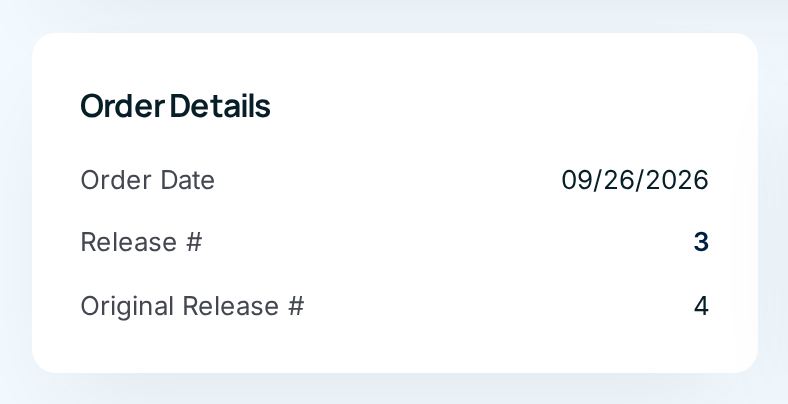
| Where | Order # | Release # | Original Release # |
|---|---|---|---|
| Order page (the title, and the Order Details card) | Title | Card | Card |
| Printed release, top-right block, under Mfg code | Yes | Yes | Yes |
| Orders list | Yes | Searchable | Searchable |
The search box on the Orders list accepts a release number. Choose the supply partner filter as well, since the same release number can belong to several supply partners.
Where you'll see this
- Orders: entering, releasing and printing an order.
- Pick, pack & ship: the printed release the warehouse works from.
- Supply Partners: each supply partner's orders.