The audit chain
What this is
Every stock change in ConsignTrak is recorded as a movement. Each supply partner's movements are linked into an audit chain: every new movement is sealed together with the one before it. If anyone changed or deleted an old movement, even directly in the database, the chain would stop adding up.
This page is the administrator's view. It covers what the chain proves, how to give a supply partner their anchor, how the chain gets checked, and what to do if a check fails. For the plain-English introduction, see The audit trail.
A closed month's statement shows what the warehouse says happened. The audit chain shows that the movements behind the statement haven't been rewritten since. Together they let a supply partner prove their stock history to an auditor without taking the warehouse's word for it.
Before you start
- Role: Administrator. Only Administrators see the Audit Chain Anchor on a supply partner's page.
- Settings: none. The chain is always on and can't be switched off.
- You'll need: a supply partner with at least one receipt, shipment or adjustment. A partner with no activity has no chain yet.
What the chain proves, and what it doesn't
| The chain proves | The chain doesn't prove |
|---|---|
| No movement has been edited since it was recorded: not the quantity, item, bin, person, time or reason. | That the movement was right in the first place. A miscount is recorded faithfully, and fixed by a new adjustment. |
| No movement has been deleted, and none has been slipped in among older ones. | Anything about records that aren't stock movements, such as an order's notes or a customer's address. |
| One supply partner's history is complete up to a given entry. | Anything about movements recorded before the chain was switched on at your installation, unless those were sealed later. |
Two things that look like changes don't break the chain:
- A correction. Fixing a mistake adds a new movement at the end. The original stays untouched.
- Closing a month. A close takes a snapshot. It doesn't change any movement.
Step by step
Give a supply partner their anchor
-
Open the supply partner from Supply Partners and scroll to the bottom.
-
Click Audit Chain Anchor to open it.
-
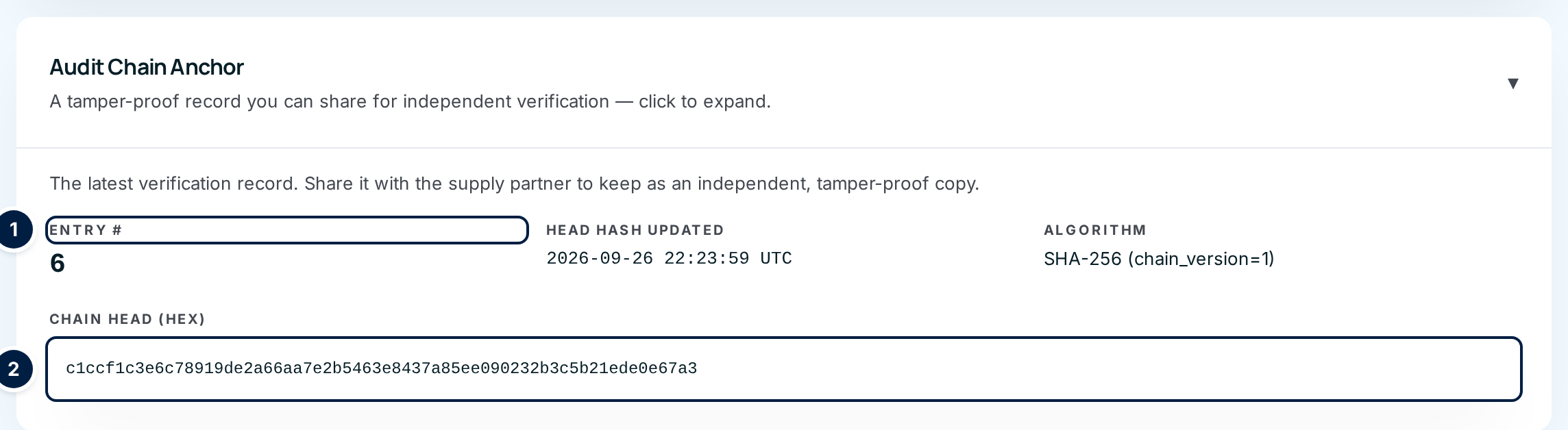
Copy the Entry # ① and the long Chain Head (hex) code ②, along with Head Hash Updated and Algorithm.
-
Send them to the supply partner with their statement, for example after each month is closed. Ask them to keep each anchor with the statement it came with.
Before you send an anchor, ask whoever runs your installation to run the chain check for that supply partner (see below). Then you know the code you hand over was verified that day.
Get the chain verified
ConsignTrak has no button for checking the chain. The check runs on the server, so whoever runs your ConsignTrak installation does it. You ask for it. The check is usually also scheduled to run regularly by itself.
The check does two things for each supply partner:
- It walks the chain from the first movement to the latest. It recalculates every seal and compares it with the one stored.
- It compares the end of the chain with the Chain Head shown on the partner's page, so a change to that summary is caught too.
To check against an anchor a partner kept:
- Get the anchor back from the supply partner: the Entry # and the Chain Head (hex) code.
- Ask whoever runs your installation to check that supply partner's chain, giving them the manufacturer code and the anchor.
- Pass on the answer. If the chain still leads to that same code at that entry, nothing up to that point has changed since the partner received it.
A supply partner's own auditor can also check the chain independently. They need an export of the partner's movements from whoever runs your installation, the anchor, and ConsignTrak's published checking method. The developer section covers the technical side.
Every field and option
The anchor is the only audit-chain control in the app.
| Field or control | What it means | Required | Default | What changes when you set it |
|---|---|---|---|---|
| Audit Chain Anchor (click to expand) | Opens the card on the supply partner's page. Administrators only. | — | Collapsed | Shows the anchor. |
| Entry # | How many movements are in this partner's chain. It grows with every receipt, shipment, adjustment and count. | — | — | Read-only. |
| Head Hash Updated | When the latest movement was added, in UTC. | — | — | Read-only. |
| Algorithm | How the seals are made (SHA-256, version 1). Include it when you send the anchor. | — | — | Read-only. |
| Chain Head (hex) | The 64-character code that sums up the whole history so far. Any change to any past movement would change it. | — | — | Read-only. Select it to copy. |
| No inventory activity has been recorded… | The partner has no movements yet, so there's no anchor. | — | — | Read-only. |
What happens next
- The anchor moves on. The Entry # and Chain Head change with every new movement, so next month's anchor differs from this month's. Each one proves the history up to its own entry. Old anchors stay valid.
- Nothing on screen changes when you view or copy the anchor.
If the chain doesn't verify
A failed check means a movement was changed or deleted after it was recorded, or the chain's summary was edited. ConsignTrak's screens can't do either, so treat it as a security incident, not a data-entry mistake.
- Stop recording stock changes for that supply partner if you can. Adding movements on top of a broken chain makes it harder to work out what happened.
- Get the details from whoever ran the check. The check names the first entry that failed. That tells you exactly which movement changed.
- Tell whoever runs your installation to keep the evidence. They compare that movement with the last good backup to see what changed. The damaged chain is kept as evidence, not repaired over.
- Record the incident. A change to a month that's already closed is a quality-records incident whatever the cause. Write down what was found, when, and who was told.
- Tell the supply partner what changed and which of their anchors are affected. Their anchors from before the changed entry still verify.
Restarting a broken chain can't be done from ConsignTrak's screens. Whoever runs your installation handles recovery.
Common problems
"No inventory activity has been recorded for this supply partner yet, so there's nothing to verify." — The partner has no movements yet. An anchor appears after their first receipt, shipment or adjustment.
I don't see Audit Chain Anchor. — Only Administrators see it.
The partner's anchor doesn't match what's on screen today. — That's normal. The on-screen anchor is the latest one. The partner's anchor proves the history up to its own Entry #, so ask for a check against it (see above).
A statement shows "Corrections from prior period". Did someone change history? — No. A correction is a new movement added this month. The original movement is still in the chain, unchanged.