Accounting periods & the audit chain
What this is
An accounting period is one calendar month of stock activity. At the end of each month, ConsignTrak closes the period. It takes a snapshot of every supply partner's stock: what they started the month with, what moved in and out, and what they finished with. After that, nothing can be recorded into that month.
The closed months are what each supply partner's statements are built from. The audit chain is the proof that the record behind those statements hasn't been changed after the fact.
The stock belongs to the supply partner, not the warehouse. A statement they can file, reconcile and show an auditor only works if last month's numbers can never move. Closing a period freezes them. The next month starts from exactly the number the last one ended on.
Who can do what
| Role | What they can do |
|---|---|
| Administrator | See the Periods list, the month-by-month rollups and each supply partner's reconciliation, and close a period. |
| Office | See the Periods list, rollups and reconciliations. Office users can't close a period. They don't see the Close button. |
| Warehouse | Nothing here. Periods don't appear in their menu. |
| Supply Partner | Never sees this screen. They see their own statements in the portal once a month (or quarter) is closed. See Orders, receiving, reports & statements. |
Where to find it
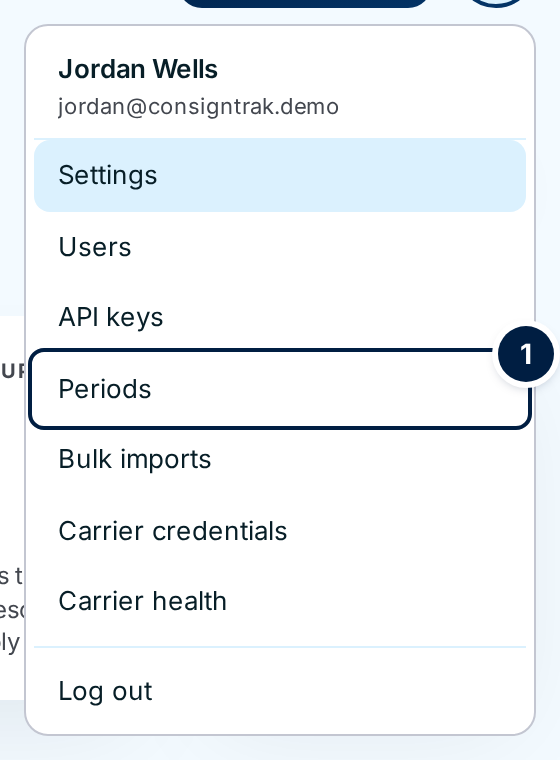
Open your account menu (your initials, top right) and choose Periods ①.
How a month gets closed
Most months, nobody has to do anything:
- The month ends. From the day after month-end, the month can be closed.
- ConsignTrak closes it automatically. A scheduled job checks every hour and closes each finished month in order, oldest first. It never closes the month you're in.
- The balance check runs. For every item, ConsignTrak checks that the closing stock equals the opening stock plus the month's activity. If any item doesn't add up, the close stops and leaves the month open for an administrator to look at.
- Statements appear. Each supply partner gets a statement for the month in their portal, or for the quarter once all three months are closed if their record is set to Quarterly.
There are two times an administrator closes a month by hand:
- The very first close on a new installation, called the Genesis close. ConsignTrak never does this one automatically.
- After the automatic close stopped because the balance check failed, once the problem is fixed.
Some installations switch the automatic close off. Then an administrator closes every month by hand. Ask whoever runs your installation which applies to you.
In this section
- Rollup, reconcile and close: every column and button on the Periods screens, what's locked after a close, and the statements supply partners receive.
- The audit chain: what it proves, the anchor on a supply partner's page, how it's verified, and what to do if it doesn't verify.
Related pages elsewhere:
- The audit trail: the plain-English introduction to movements and the audit chain.
- Creating and editing supply partners: where the statement Cadence (Monthly or Quarterly) is set.